Shift handoff (SBAR)
Draft an SBAR handoff for the incoming shift, or a quick transfer SBAR for a single patient.
Handoffs pass the baton in SBAR format. There's a handoff board for the shift change, and a quick transfer SBAR for handing one patient to a specific colleague.
The handoff board
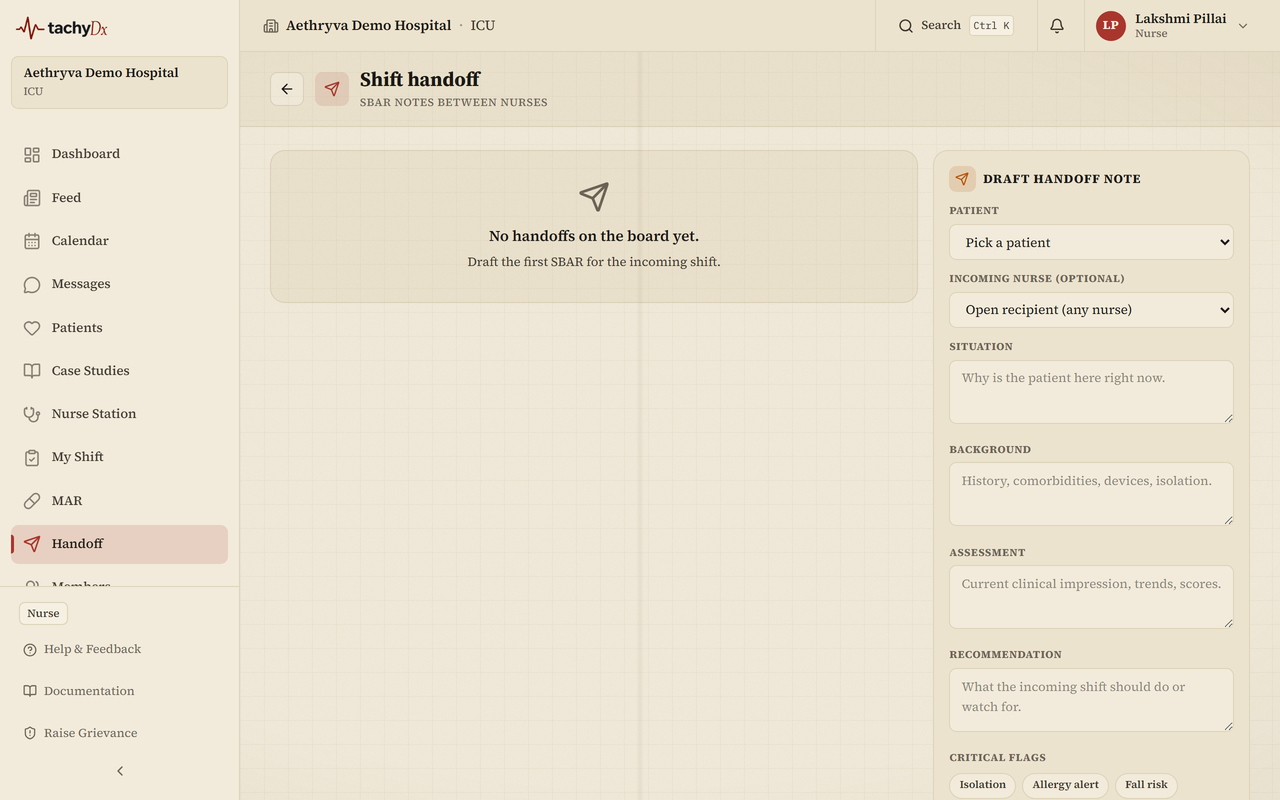
Open Handoff from the sidebar (“Shift handoff — SBAR notes between nurses”). The left column lists recent handoffs (marked Sent / Received / Team, with acknowledgement status); the right column is a Draft handoff note panel where you compose a new SBAR.
Ending your shift
- 1From My Shift, select End shift to open the handoff composer.
- 2Review the last-12-hours context chips (encounters, vitals, meds, alerts).
- 3Optionally select Draft with AI to pre-fill the note, then edit it. (Always review AI-drafted text.)
- 4Fill the Situation, Background, Assessment, and Recommendation fields.
- 5Select Send to incoming shift.
Note
Round-wide handoffs aren't routable to a recipient yet — for now, share a round summary by voice. Patient-specific and shift handoffs route normally.
Quick transfer SBAR
For an in-the-moment transfer, the Quick Transfer SBAR composer pre-fills S/B/A/R from the latest data and requires you to pick a recipient. You can attach a photo and record up to a 10-second audio note, then select Send SBAR Handoff.