Bed map and raising a Code Blue
The charge-nurse bed map and ward overview, plus how anyone at the bedside raises and resolves a Code Blue.
Charge nurses run the ward from the bed map and ward overview. Any bedside clinician can raise a Code Blue from a patient's chart.
The bed map
Open Bed Map from the sidebar (charge nurses; nurses can view it read-only). Wards are shown as grids of bed cards: empty beds are dashed, occupied beds are tinted by acuity (green / amber / red from the latest NEWS2 / qSOFA), and an active Code Blue outlines the bed in red. The header shows occupancy across all wards.
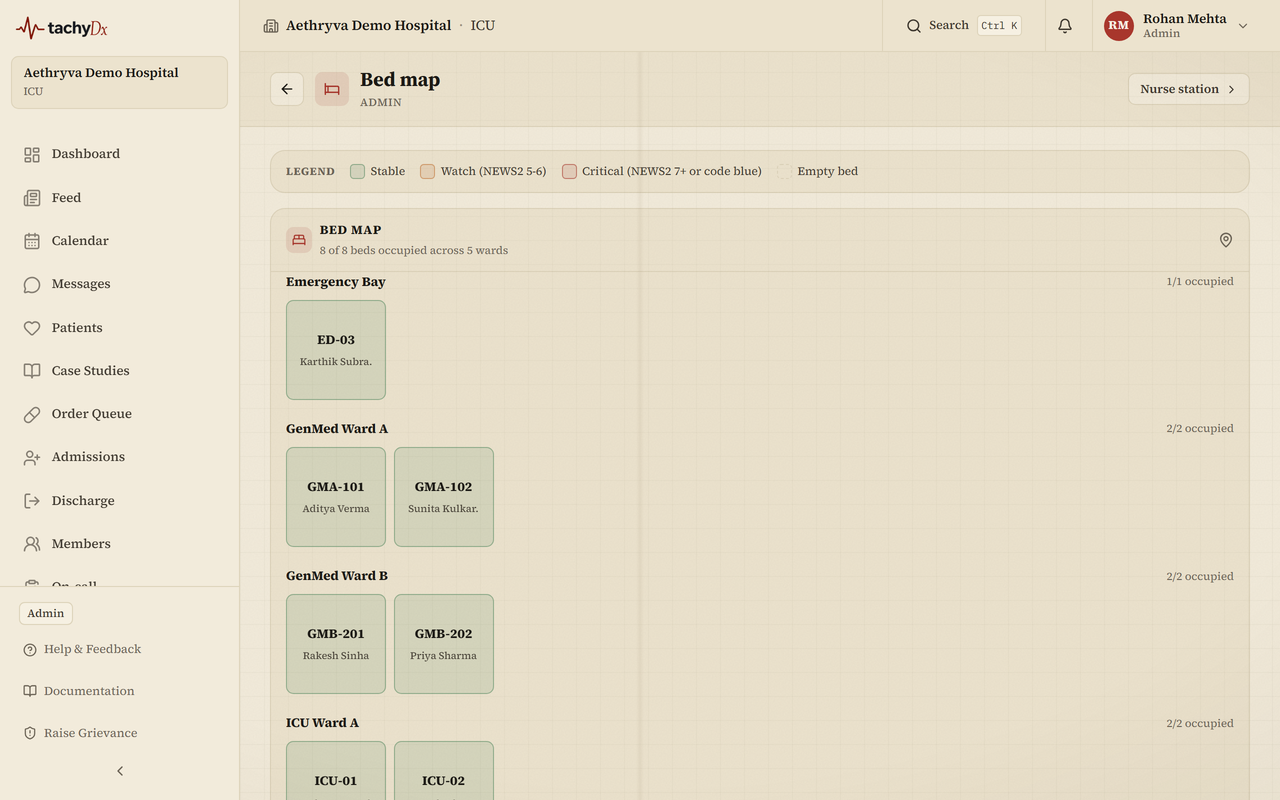
Ward overview
The charge-nurse Ward Overview builds on the bed map with a Code Blue banner, stat cards (Active patients, Critical alerts, STAT orders, Critical labs), a critical-alerts feed, pending orders grouped STAT / Urgent / Routine, the patient-call board, the nurse roster, and an assignments grid for covering unassigned patients.
Raising a Code Blue
- 1On the patient's chart, select the Code Blue button.
- 2In the Initiate Code Blue dialog, optionally enter a Location (e.g. Ward 3, Bed 12).
- 3Select Call Code Blue. Every team member is alerted, including by push notification.
Important
Only confirm a Code Blue in a true emergency — it alerts the whole team. Nurses, charge nurses, and doctors can raise one; pharmacists, clerks, and members cannot.
Resolving it
Select the active CODE BLUE ACTIVE chip to open the Resolve Code Blue dialog. Add resolution notes and select Mark resolved, or False alarm if it was raised in error.