Rounds, on-call, and calendar
Run structured rounds with Round Mode, manage the on-call rotation, and use the team calendar.
Rounds, on-call, and the calendar keep the team coordinated across shifts.
Rounds and Round Mode
The Rounds page (“Today's Rounds”) lists the day's rounds with status chips — In Progress, Completed, Skipped. To round efficiently, select Start Round Mode.
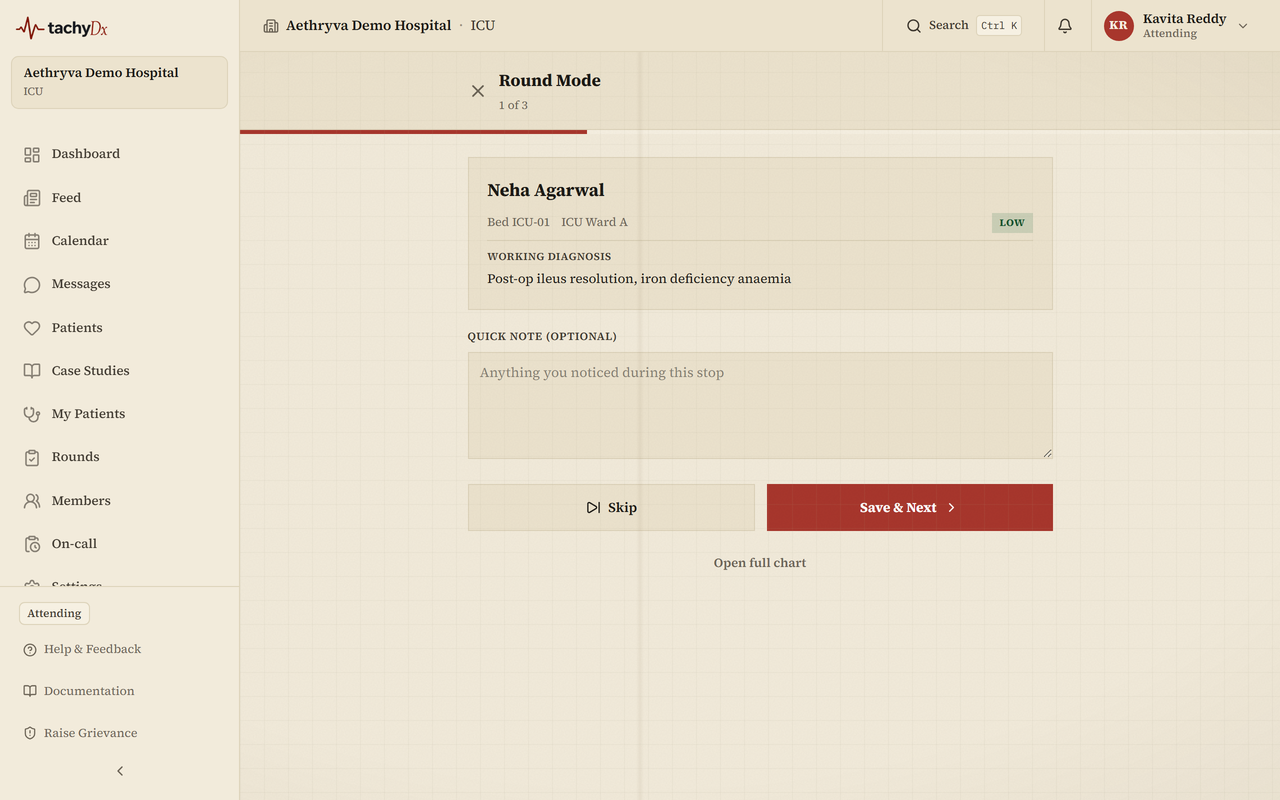
- 1Select Start Round Mode to enter a full-screen walkthrough of your assigned patients.
- 2At each stop, review the patient and write a brief note in the text box.
- 3Select Save and Next to record the visit and move on, or skip to advance without a note.
- 4When you reach the end, Round Mode shows a completion summary and returns you to your dashboard.
On-call
The On-call page manages the rotation grouped by role (attending, consulting, surgeon, physician, resident, charge nurse, nurse, pharmacist). Admins add and edit rotation windows. Whoever is currently on-call is the default target when someone pages the attending or resident.
Paging
From a patient's quick actions, Page attending or Page resident opens a paging form: pick the patient and target, set the urgency (emergent / urgent / routine), and fill the SBAR fields — Situation (required), Background, Assessment, Recommendation. Select Send Page.
Calendar
The Calendar offers month, week, and day views with event filters and a create-event form. A patient-scoped calendar is also embedded on the Chart tab.