The patient chart and its tabs
Everything about one patient, organised into tabs — plus the header, quick actions, and right rail.
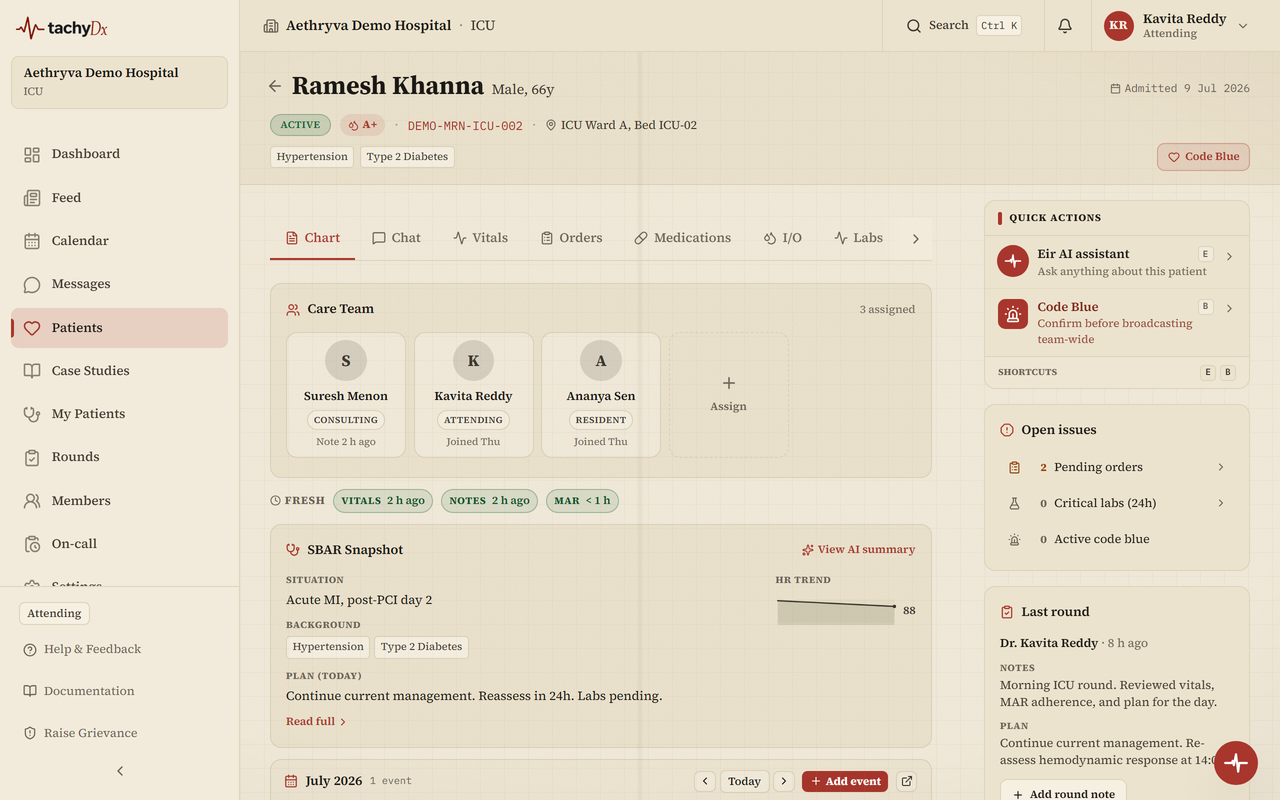
The patient chart is the heart of the workspace. A header identifies the patient; a strip of tabs organises everything recorded about them; a right rail holds quick actions.
The header
At the top you'll find the patient's identity, admission date, ABHA ID, an allergies pill, chronic-condition chips, and a clinical-scores strip (NEWS2 / qSOFA). Role-gated action buttons sit on the right: the Code Blue button, Discharge readiness, and Discharge summary. Read-only roles instead see an Observer · read-only marker.
The tabs
The tab strip runs in this order:
| Tab | What's in it |
|---|---|
| Chart | The at-a-glance summary: SBAR snapshot, latest vitals, critical labs, current meds, timeline |
| Chat | Care-team discussion for this patient |
| Vitals | Recorded vitals as a list or trend charts (see Charting vitals) |
| Orders | Clinical orders, including medication orders |
| Medications | The medication list and the MAR (see the MAR guide) |
| I/O | Intake and output |
| Labs | Lab results |
| Documents | Uploaded reports and imaging |
| SOAP Notes | Structured encounter notes |
| Nurse Notes | Nursing documentation |
| Wounds | Wound tracking |
| Outcomes | Outcome records |
| Consents | Consent forms |
The Chart tab
The Chart tab is the summary view. It leads with the SBAR Snapshot, then the patient's calendar, critical lab values, current nurse and handoff, pain score, latest vitals (HR, BP, temperature, SpO2, respiratory rate, weight), next-due medications, an activity timeline, and current medications.
Quick actions
On wide screens a Quick actions drawer sits in the right rail, with cards for the Eir assistant, a quick SBAR handoff, paging the resident or attending, round mode, and Code Blue.