Nurses · 4 min read
Nurse Station and My Shift
Your shift home: clock in, see critical alerts, work outstanding tasks, and end your shift with a handoff.
Nurse Station is your home base. Bedside nurses see My Shift; charge nurses see the Ward Overview (covered in the Bed map guide).
Starting your shift
- 1Open Nurse Station (or My Shift) from the sidebar.
- 2In the shift hero card, select Clock in. The card shows your shift type (Day / Evening / Night), your ward, and how long you've been on.
- 3Work through your day from the cards below.
- 4At the end, select End shift to open the handoff composer, then Clock out (it confirms before ending).
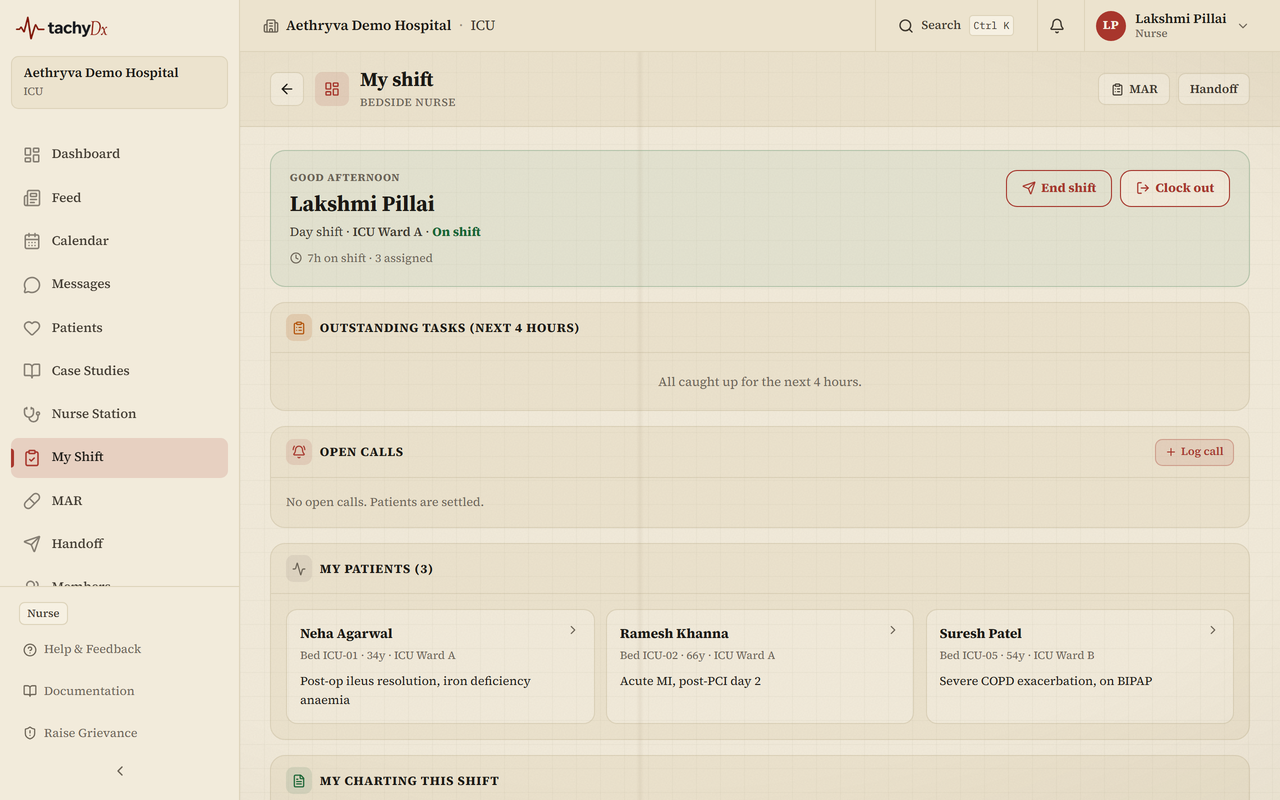
What's on My Shift
- Critical alerts for my patients — high/critical NEWS2, qSOFA ≥2, critical labs, and allergy-vs-order conflicts for your patients.
- Outstanding tasks (next 4 hours) — MARs due, nurse-targeted orders, and vitals due, each showing how late or how soon it is.
- Open calls — patient calls, with a Log call button.
- My patients — your assigned patients (a charge nurse assigns these from the ward overview).
- Handoffs to acknowledge and Doctor orders to acknowledge — with Acknowledge and Open chart buttons.
- My charting this shift — running counts of vitals, MARs, and notes since you clocked in.