Doctors · 3 min read
Your dashboard
The role-aware home screen for attendings, residents, consultants, surgeons, and service physicians.
When you open your workspace, you land on a dashboard tailored to your role. It surfaces the patients and tasks that need you first, sorted by clinical urgency.
The attending dashboard
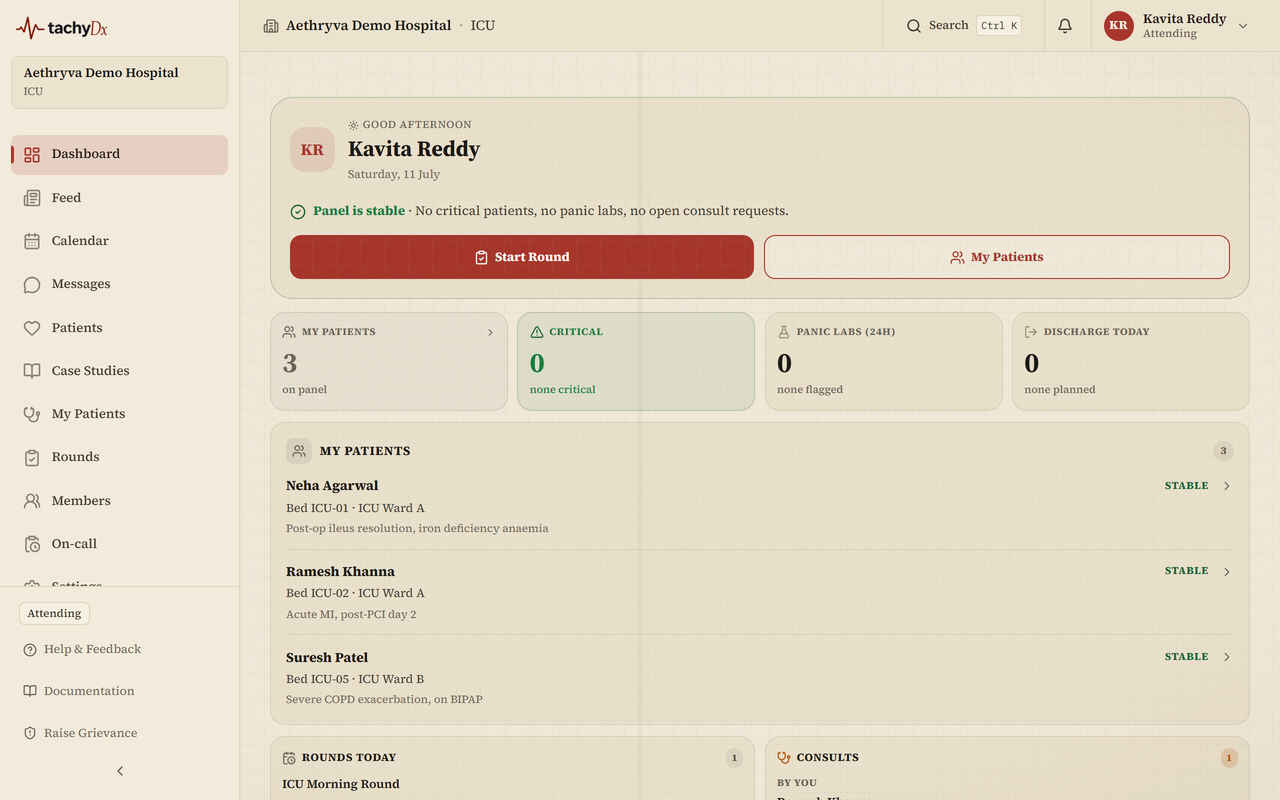
The attending view is the primary doctor dashboard. From the top:
- A greeting hero with two quick actions — Start Round and My Patients — and a headline that reflects what's urgent (active Code Blues, critical patients, panic labs, or consult requests).
- A 2×2 stat grid: My patients, Critical, Panic labs (24h), and Discharge today.
- A My patients card showing your most-deteriorating patients first (Code Blue, then acuity, then recent panic labs), with acuity labels Critical / High / Moderate / Stable.
- Rounds today and Consults cards, a Discharge ready list, a Hospital pulse card, and a Recent activity feed.
Other doctor dashboards
- Resident — quick actions Start Round and Page Attending; cards for pages from nurses, patients not yet seen, open drafts, queued tasks, and your on-call schedule.
- Physician (service mode) — a specialty-gated queue for radiology, pathology, anaesthesia, intensive care, or nutrition, with STAT / Urgent / Routine priority. If your specialty isn't set, the dashboard prompts you to set it in your profile first.
- Surgeon and Consulting — the same layout, focused on the OT schedule and the consult queue respectively.